Nutanix CE with AOS and Prism Central 7.5 (but older version of AHV)
At the moment of writing this, Nutanix CE is available for deployment, with AOS 6.8.1 and the corresponding AHV (don’t know the exact version, but it is somewhere in the vicinity of AHV-20230302.101026.
When you deploy this, you can upgrade, through to the 7.0 branch, with AHV 10.0, but if you want to go further than that, you run into issues when you run on a nested environment, as I do. There is no supported method to upgrade AHV beyond version 10.0, because the method of upgrade is done through a reinstall of the hypervisor and in that process, there are (currently) no drivers for the storage controller that are created in the nested appliances. So after I upgraded my lab to AOS version 7.3, I ran an unsupported AHV version of 10.0.1.6, which was not able to upgrade through the regular LCM processes (or otherwise).
Since I wanted to upgrade PC and AOS to version 7.5, I had to find a different way. I could accept the “old” hypervisor and I am sure I will run into things that I cannot do with this installation, but it was worth trying to get there anyway.
So I started over again, with a new lab (besides the old stuff, that you could have read about in earlier blogs), with a three-node deployment of a Prism Elements cluster, running AOS 6.8.1 and the corresponding hypervisor. Still running Prism Elements only (so no Prism Central deployed).
Then I upgraded the different components in the following order (just noting the AOS and AHV versions, I also upgraded the other components):
- AOS: 6.8.1 –> 7.0.1.11
- AHV –> 10.0.1.5
At that stage I downloaded and manually uploaded the AOS 7.5 bundle into LCM and directly upgraded from 7.0.1.11 to 7.5 (which is a supported upgrade path).
When that was done, I did receive:
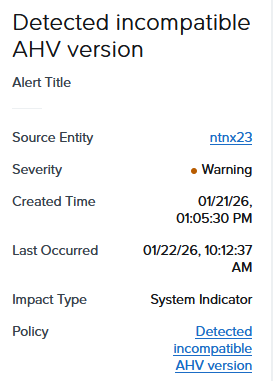
for all the hosts, but I choose to ignore that (for now). When this was completed, I deployed Prism Central 7.5.0.1 and registered my cluster. I also deployed the Network Controller, which went fine, even though the AHV version is not supported (and for that, I get some warnings).


One thought on “Nutanix CE with AOS and Prism Central 7.5 (but older version of AHV)”